High-risk work, governed end to end
Control the complete lifecycle of every high-risk work permit — safer at issue, defensible at audit, live across every site. Every permit checks the people, the contractors, the controls and the space around it before work starts.

What hurts today
Paper permits, real risks
A permit in a folder cannot check a ticket, spot a clash, verify an insurance or alert anyone before it expires.
Conflicting works
Hot works above, fuel storage below, excavation beside live services — paper systems find out afterwards. Paint and hope is not a control.
Expired, unsigned, unverified
Lapsed permits, missing authorisations and contractors whose scheme membership quietly ended surface in investigations, not in time.
Every permit, every site, one live picture
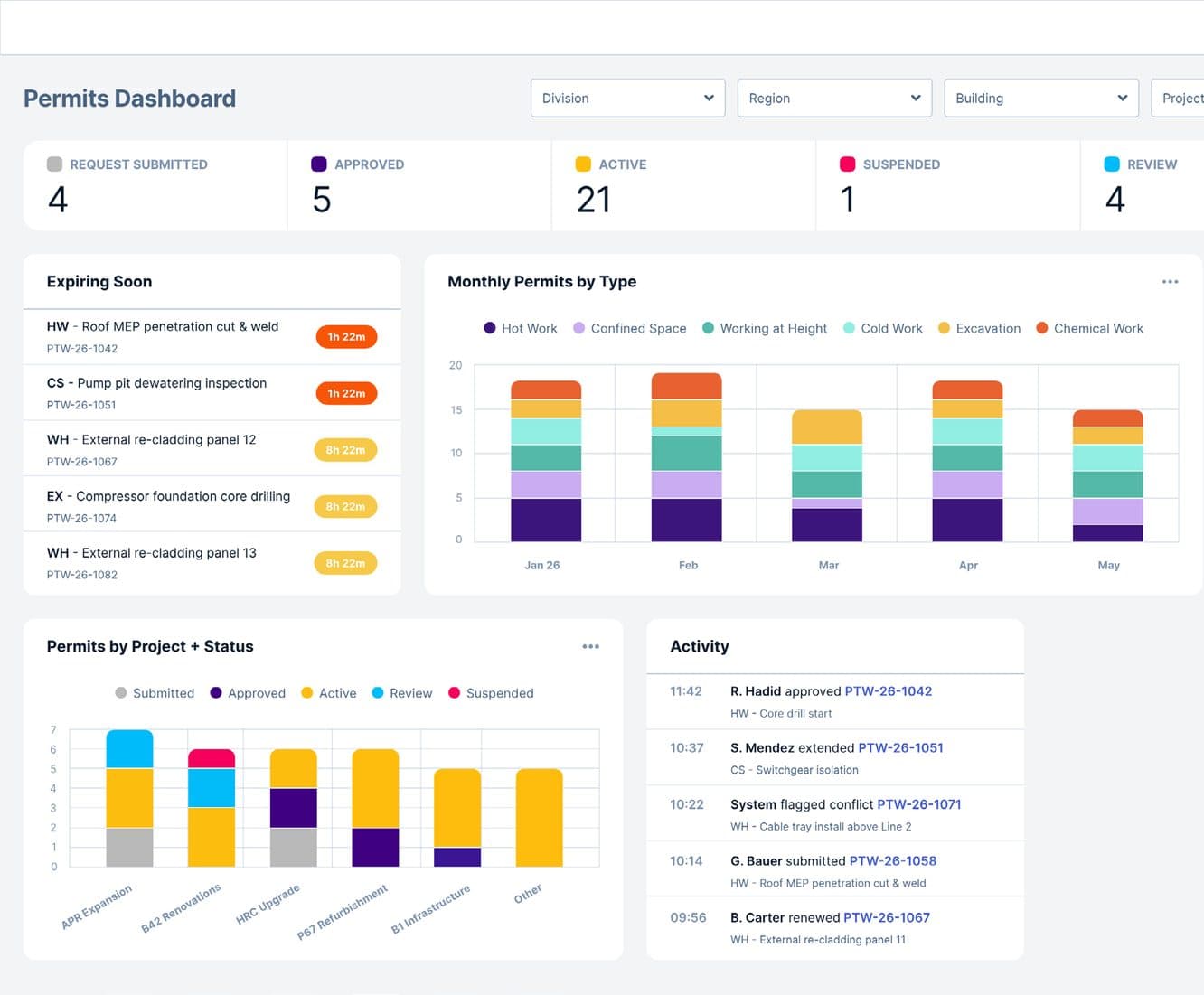
Live dashboards, analytics and logs
A real-time, drillable view of permits across every region, site, project and contractor.
Permit calendar
A forward view of planned high-risk activity, so resource and supervisor coverage is set before work starts.
Audit-ready digital records
An immutable, exportable record of every permit, signature, photo and decision.
Granular user permissions
Fine-grained, role-based control over who can issue, hold, approve or close each permit type.
The board's status mix
47permits on the board
The same counts as the dashboard above — one live board, every status accounted for.
Expiring soon
HWRoof MEP penetration cut & weld
1h 22mCSPump pit dewatering inspection
1h 22mWHExternal re-cladding panel 12
8h 22mEXCompressor foundation core drilling
8h 22mWHExternal re-cladding panel 13
8h 22mThe dashboard's expiring-soon list — nothing lapses silently, and renew or extend is one action away.
Live activity
Every approval, extension, renewal and system flag, timestamped as it happens.
As fast as the site moves
Designed for decision speed
An intuitive interface with minimum taps and smart defaults — so requests and time-critical calls happen at site tempo.
Multi-platform access
Desktop, mobile and on-site QR scanning for permit issue, approval and verification.
Offline functionality
Work without connectivity; everything syncs when the signal returns.
Voice-to-text capture
Fast dictation for the moments when typing isn't practical.
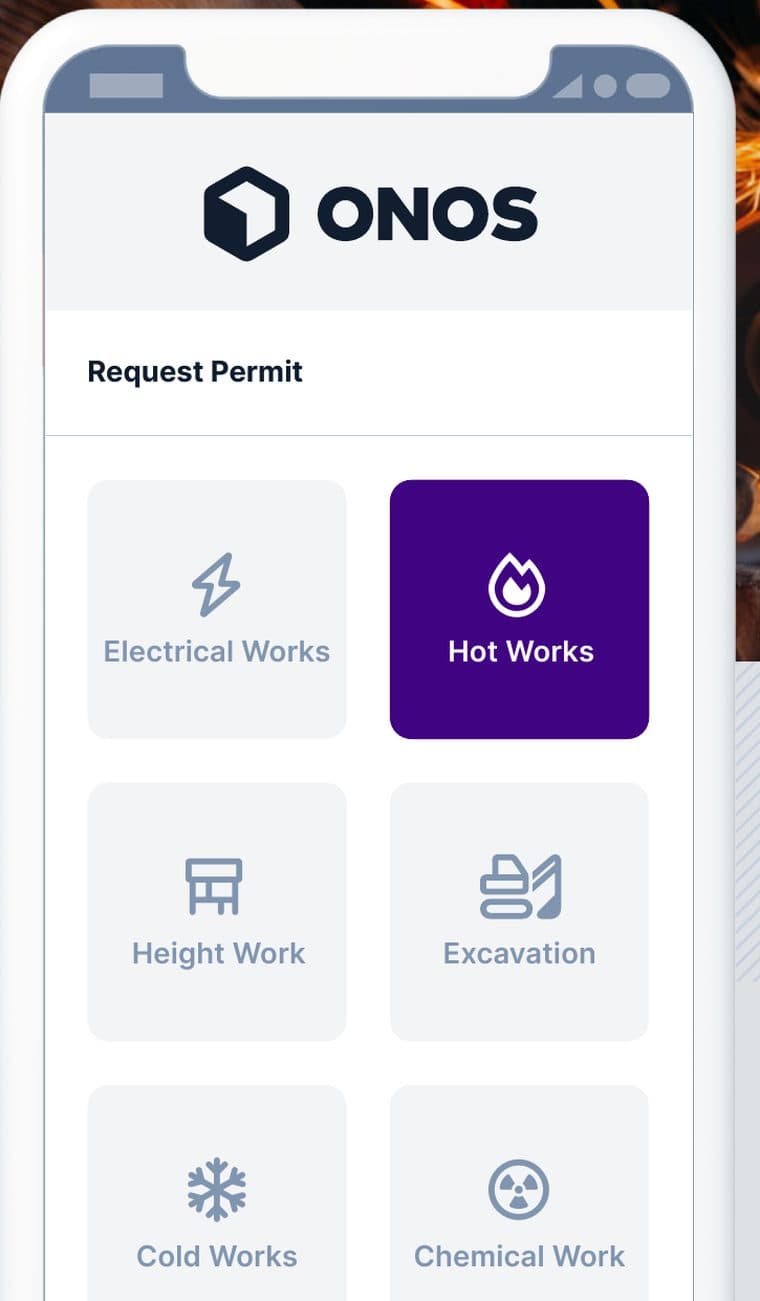
Request permit
- Electrical works
- Hot works
- Height work
- Excavation
- Cold works
- Chemical work
The six permit types on the mobile request screen — one tap each.
Your permit types, your workflow
- 01Request
- 02Approve
- 03Issue
- 04Close
Multi-stage, role-based workflow from request to closure — with clone, cancel, suspend, renew and extend linked back to the original at every step.
Customisable permit templates
Hot work, confined space, working at height, excavation, electrical, lifting — and bespoke templates for any high-risk activity.
Concurrent permits
One activity, multiple linked permits in a single request — shared inputs auto-populate, and each permit keeps its own workflow.
Configurable approval workflows
Multi-stage, role-based workflows across request, approval and closure.
Permit lifecycle controls
Clone, cancel, suspend, renew and extend — every action linked back to the original permit.
Preparatory action management
Pre-work tasks tracked to completion in real time before a permit can be issued.
Safe Plan of Action (SPA)
The work team's point-of-work risk assessment — completed before work can start, and re-run whenever conditions change.
Controls that are real, not paperwork
Hazards, controls and PPE
Hazard, control and PPE requirements captured against every permit.
Automated hazard and control population
Hazards and controls pre-loaded by permit type, location and activity, so issue is faster and nothing is forgotten.
Integrated Lockout/Tagout (LOTO)
Isolation points, lock numbers and removal authorisation embedded in the permit record.
Evidence upload and verification
RAMS/JSA and task documentation collected at submission and checked before a permit can be issued.
Inspection checklists
Pre-start and close-out inspections, with evidence attached.
The whole site, zone by zone
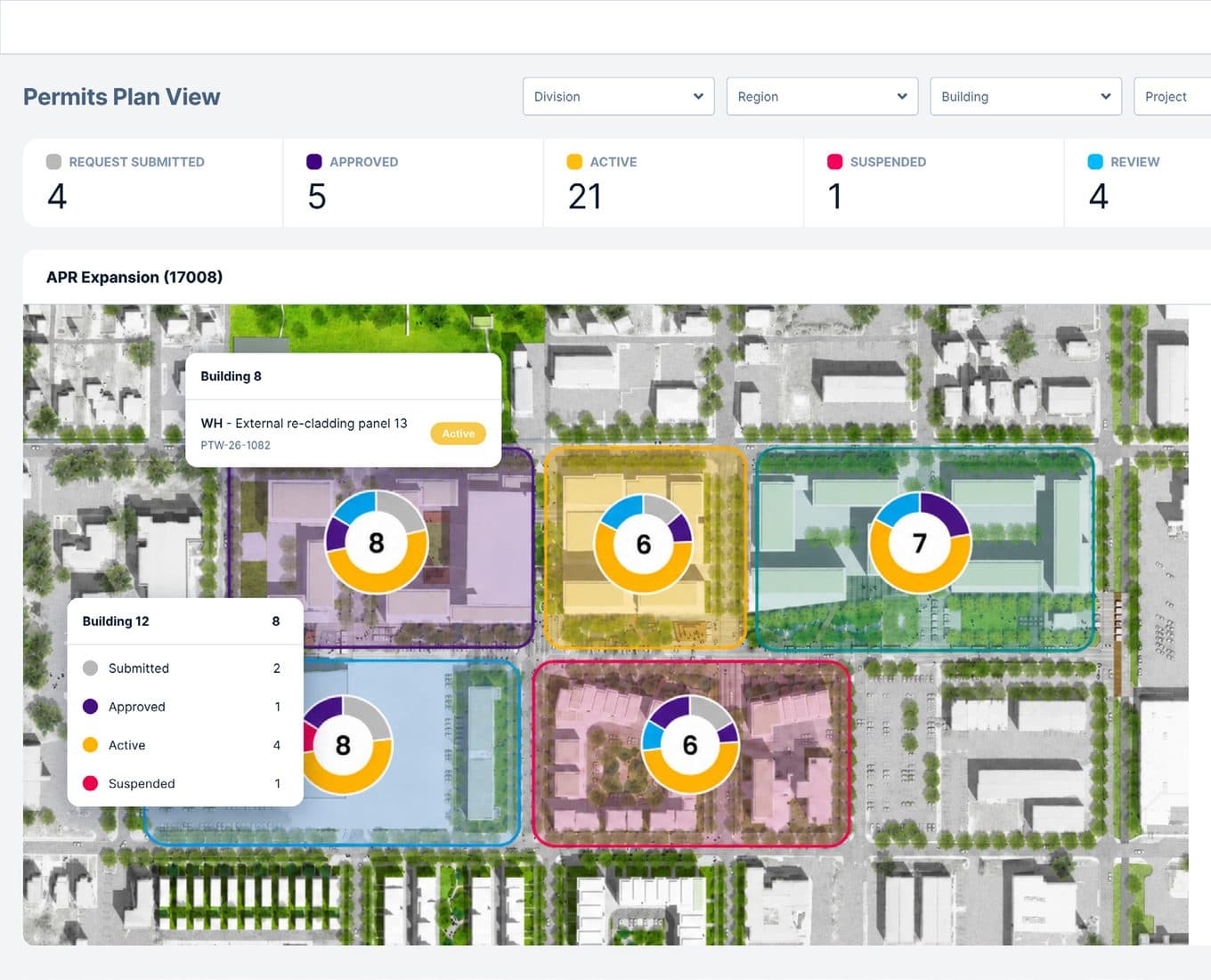
Zoned floor plans and site maps
A live, colour-coded overlay of every active permit, by status and type.
Spatial conflict detection
Automatic warnings when permits would put incompatible activity in the same zone.
Sequential dependency control
Dependent works enforced in the correct order, so nothing issues out of sequence.
Permits by zone
The plan view's own zone counters — every open permit placed on the map.
No permit without proof
Supplier verification at issue
Every contractor on a permit confirmed as pre-qualified — insurances, accreditations and company documents valid at the moment of issue.
Inductions
Every individual named on a permit must hold a current site-specific induction, checked automatically at the point of issue.
Training
Issuer, holder and supporting roles validated against the live training matrix — expired or missing competencies block the permit until resolved.
Configurable gating
Define which checks are mandatory, advisory or disabled — by permit type, module, region and site.
Intelligence and automation
Automated notifications
Submissions, approvals, expiries, conflicts and overdue items — delivered on the right channel, to the right person.
Landing by the end of Q1 2027
Everything else on this page is capability you can use today. Three items from the 2026 Permits programme are still in build:
Multilingual interface and content
A workforce-language interface, with translated permit content.
AI-powered suggestions
Recommended additional controls, flagged gaps, and patterns surfaced from historical permits.
Third-party SSIP validation
A direct API link to live independent H&S validation (e.g. SafeContractor, HighWire) alongside internal PQQs — so no permit can be issued to a contractor whose scheme membership has lapsed or been suspended.
Who gets what
Site staff
- Submit a permit request from your phone in under 5 minutes, photos included, and watch it route to every approver at once instead of one after another.
- QR codes on the printed permit let contractors check requirements and sign off electronically on-site.
- Q checks the permit against RAMS, competencies, sign-ins and active work, catching gaps before anyone’s exposed.
EHSQ admins
- A live permit register shows status — requested, under review, issued, expired, closed — across every site, not a spreadsheet per site.
- Dashboard alerts flag expired-but-not-cancelled permits and requests awaiting your approval before they become a problem.
- Overlapping high-risk activities in the same zone get flagged before approval, not discovered afterwards.
Leadership
- Enterprise-wide analytics show permit volumes, average approval times and expired permits across the estate.
- Permit records link directly to incident data, revealing whether an incident happened during permitted work.
- Complete digital records with photo evidence and approval audit trails — nothing missing when it matters.
Q checks the work against the system around it.
Q reads the permit alongside RAMS, competencies, sign-ins, contractor compliance, risk assessments and active work — catching gaps before people are exposed. From Q1 2027, Q recommends additional controls, flags gaps and surfaces patterns from historical permits at the point of request.
The old way vs. with Onos
Issuing a permit
The old way
45 minutes with sequential approvals
With Onos
15 minutes with parallel approval workflows
Expired permit tracking
The old way
30% of permits expired but never formally cancelled
With Onos
Automated alerts ensure systematic permit closure
Contractor requests
The old way
Phone calls and WhatsApp messages
With Onos
Structured digital requests, all required information captured
Analytics
The old way
No data on permit trends or high-risk activity volumes
With Onos
Analytics reveal permit patterns that inform risk management
Record integrity
The old way
Paper permits may be incomplete or missing if an incident occurs
With Onos
Complete digital records with photo evidence and approval audit trails
100%
permits competency-checked
0
silent expiries
1
live board across all sites
Modules that work with this one
See Permits to Work in action.
Bring a permit template or high-risk workflow. We will show how Onos verifies the people, checks the space and evidences every decision.
Modular pricing — pay only for what you use.